XIRR Calculator
What is XIRR
XIRR stands for Extended Internal Rate of Return. It is a financial measure that calculates the annualized return for a series of cash flows occurring on different dates. Unlike simple return calculations, XIRR considers both the amount of money that moves in or out and the exact date on which each flow occurs. This combination of values and dates gives a more accurate estimate of how your investment actually performed over time.
To understand the need for XIRR, think of a real investor. Most people do not put money into a fund only once. They add more later, sometimes they pause contributions or withdraw a portion. A simple return formula treats all these flows as if they occurred together, which hides the actual performance. XIRR respects timing. Money added earlier has more time to grow, money added later has less time and partial withdrawals reduce the amount available to earn returns. All of this is accounted for in the formula.
Why XIRR Matters for Investors
Investors often compare returns between different funds or investment categories. Without a consistent method of calculating returns, this comparison becomes misleading. CAGR works well when a single investment is held from start to finish. However, if someone uses SIPs, makes ad hoc contributions or switches funds midway, CAGR cannot accurately represent performance.
XIRR solves this gap by answering a simple question. If all the irregular investments and withdrawals were combined into a single organized calculation, what would your equivalent yearly return be? With XIRR, two people who invest different amounts at different times in the same fund can still compare returns meaningfully.
Another advantage is that XIRR allows you to evaluate the performance of your entire portfolio instead of just individual transactions. If you invest in multiple funds, make transfers between them or rebalance frequently, calculating performance manually becomes nearly impossible. XIRR ties everything together using all your dated cash flows.
XIRR vs Other Return Metrics
Different return metrics tell you different things. Here is how XIRR compares.
Absolute Return
This is the simplest. If you invest one lakh and get back one lakh twenty thousand, your absolute return is twenty percent. The problem is that it does not consider time. If this return came in six months, it is excellent. If it took five years, it is poor. Time matters, and absolute return ignores it.
CAGR
CAGR tells you the annual growth rate but assumes that there was only one investment at the beginning and one withdrawal at the end. It cannot handle multiple transactions, SIPs, or irregular cash flows.
XIRR
XIRR considers every single transaction with its exact date. It is the most accurate and practical return metric for real life investing.
When Should You Use XIRR
You should use XIRR in almost all investment situations where cash flows are irregular. Some examples include:
-
SIPs where you invest the same amount regularly
-
Investments with occasional top ups or skipped months
-
Stock purchases made on different dates and in different quantities
-
Real estate purchases with staged payments and monthly rental income
-
Business investments where money is added or withdrawn based on need
-
Any situation where there are inflows and outflows on different dates
XIRR also works if you receive dividends, interest, or periodic rent. Simply enter these as positive cash flows on their respective dates.
How to Use the XIRR Calculator
The XIRR calculator is designed to help you understand your real investment returns by considering the exact dates of your cash flows. The calculator on this page provides two modes Simple Mode and Cash Flows Advanced Mode. You can choose either one depending on how detailed your data is. Below is a complete step by step explanation of how to use both modes based on the actual flow of the tool.
Using Simple Mode
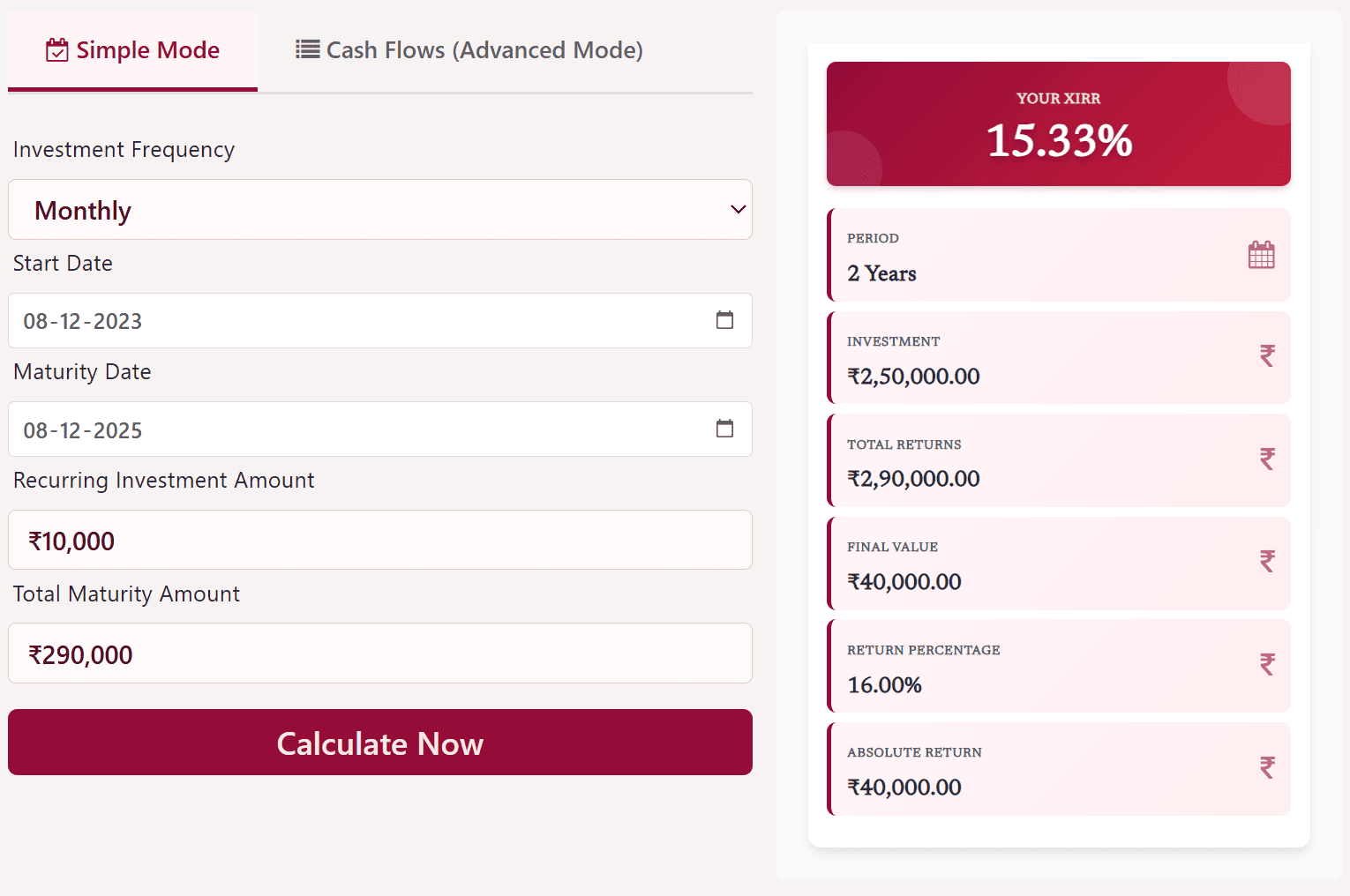
Simple Mode is created for users who invest on a fixed frequency such as monthly SIPs. Here you only have to enter a few inputs and the calculator automatically generates all cash flows in the background.
Step 1: Choose the Investment Frequency
Select the frequency of your investment. Most users select Monthly for SIP calculations, but weekly, quarterly or yearly patterns may also be available depending on your requirement.
Step 2: Select Start Date
Pick the date on which your first investment begins. This helps the calculator know when the recurring cash flows start.
Step 3: Select Maturity Date
This is the date until which your investments continue. The calculator uses this to determine the total number of installments.
Step 4: Enter Recurring Investment Amount
Type in the amount you invest regularly. For example, if you do a SIP of 10000 every month, enter 10000 in this field.
Step 5: Enter Total Maturity Amount
This is the value you expect to receive or the amount you got on maturity or withdrawal. It is the final positive cash inflow that completes the calculation.
Step 6: Click Calculate Now
Once you enter all the fields, click the Calculate Now button.
The calculator instantly shows:
-
Your XIRR percentage
-
Total period of investment
-
Total amount invested
-
Final value
-
Absolute return
-
Return percentage
The right side panel updates automatically and displays all results in a clean, card based layout which makes it easy to understand your overall performance.
Using Cash Flows Advanced Mode
Advanced Mode is built for users who have irregular cash flows. This includes lump sum investments, top ups, partial withdrawals, redemptions or any mixture of different transactions. In this mode, you manually enter every transaction along with its date.
Step 1: Understand the Input Rules
In this mode you must follow one simple rule.
Investments are entered with a negative sign because they are cash outflows.
Returns or withdrawals are entered as positive values because they are cash inflows.
The interface also shows an instruction box to remind you of this format.
Step 2: Add Your Cash Flow Rows
Each row represents one transaction. You will see columns for:
-
Date of transaction
-
Amount
-
Type (automatically tagged as Investment or Return based on negative or positive value)
-
Delete action
To add more entries, click the Add Row button.
Step 3: Enter Dates
For every entry, select the correct transaction date using the calendar picker. XIRR heavily depends on timing, so the accuracy of dates is very important.
Step 4: Enter Amounts
Type the amount of each transaction.
Examples:
-
If you invested 10000 on 28 Sep 2025, enter -10000
-
If you received 290000 on 08 Dec 2025, enter +290000
You can use Tab to move between cells and Enter to jump to the next row.
Step 5: Review Your Cash Flow List
Make sure all your investments and withdrawals are recorded.
You can delete any row using the red cross button if something needs correction.
Step 6: Click Calculate Now
Once all entries are complete, hit the Calculate Now button.
The right panel immediately updates to show:
-
Your XIRR
-
Total period of the investment
-
Total investment amount
-
Total returns
-
Final value
-
Absolute return
-
Return percentage
The calculator displays the results in bold, easy to read cards, helping you understand your performance even if your cash flows were uneven or scattered over time.

Understanding the Results of an XIRR Calculation
When you use an XIRR calculator, you usually see a results section that includes several helpful numbers.
XIRR Percentage
This is the most important number. It shows your annual return based on all transactions. If your XIRR is twelve percent, it means your investment grew equivalent to twelve percent every year.
Investment Period
This shows the time from your first transaction to your latest one. It helps you understand how long your money has been working.
Total Investment
This is the total sum of all negative cash flows. It tells you how much capital you actually put in.
Final Value
This is the sum of all positive cash flows. It shows what you received back.
Absolute Return
This is the simple difference between what you put in and what you got back.
Cash Flow Timeline
Some calculators show a timeline that helps you visualize your investment journey. You can see when you invested, when you withdrew, and how the cumulative value changed over time.
Conclusion
XIRR has become one of the most important tools for modern investors. In a world where people invest through SIPs, top up occasionally, shift between schemes or make partial withdrawals, traditional return calculations fall short. XIRR brings clarity by converting irregular cash flows into a single annualized return figure that shows your true investment performance. While it requires accurate input data, the insights it provides are invaluable.
Whether you are a beginner trying to understand your first few investments or an experienced investor managing a sizable portfolio, learning to use XIRR can significantly improve the way you analyze your returns. With the help of calculators and disciplined recordkeeping, XIRR offers a realistic, personalized view of your investment journey.